
From order to Inventor part
Quote and order line items become parametric parts in Autodesk Inventor – through the official Inventor API and only after your team has approved them.
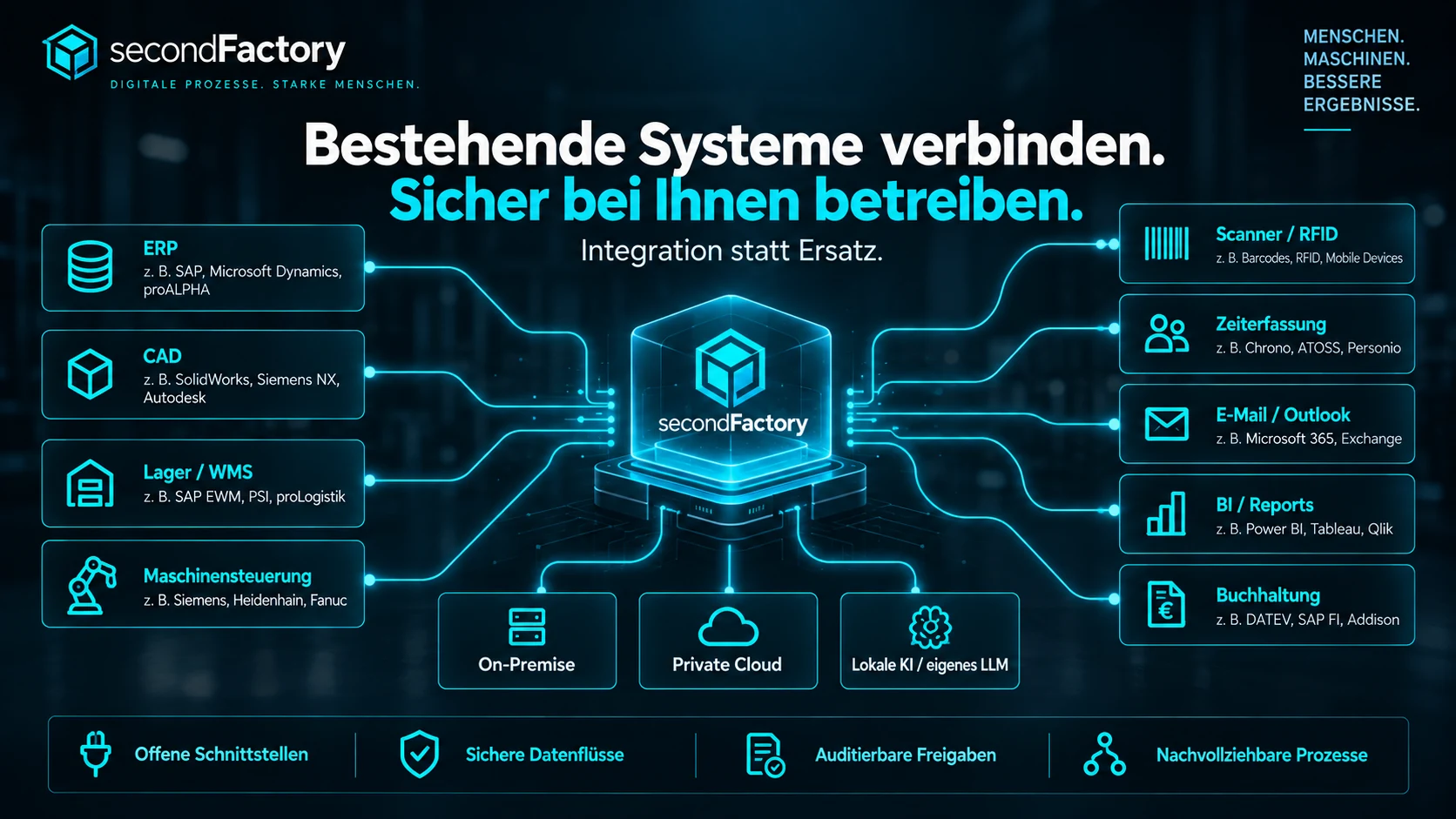
We only replace what you actually want to replace. secondFactory can work in between, on top or alongside: read data from existing systems, enrich it, coordinate processes and write results back selectively. What works well does not have to be replaced. Standard and custom interfaces can be adapted to your system landscape.
Customers, orders, items, commercial data, invoice handovers.
Inventor, STEP/STL/OBJ/DXF and custom geometry adapters.
Stock, storage locations, movements and material flows.
Profiles, programs, transfer targets, files, control adapters and status.
Identification, status reports, warehouse and mobile workstations.
Terminals, cards, REST/webhooks, CSV/JSON and external systems.
Mailboxes, MSG/EML, email drafts and document intake.
Costing workbooks, daily entry, conflict reconciliation, CSV/JSON/PDF.
Invoice data and customer-specific transfer formats; accounting export e.g. DATEV-compatible, for lexoffice, as CSV or Excel – taxes stay with your accounting department.
Reports, data exports and external reporting tools.
Central printers, label printing, device assignment and print status.
REST, webhooks, databases, files and project-specific adapters.
secondFactory connects commercial order data from your ERP with design work in Autodesk Inventor. Customers, orders, articles and line items stay linked to the part, the drawing and production.
Quote and order line items become parametric parts in Autodesk Inventor – through the official Inventor API and only after your team has approved them.
Project, line item, product type and revision are written to the part as iProperties. Dimensions are read back from Inventor for verification.
Dimensioned drawings as DWG and PDF, plus STEP and STL – each linked to order and revision and ready for CAM and production.
More on engineering: CAD automation for manufacturing · CAM automation & CNC connectivity
Bidirectional where it makes sense from a business and technical perspective.
With competing changes, a person decides instead of a silent overwrite.
Interfaces complement processes – without unnecessary system replacement.
Dedicated industry profiles show how reconstruction, engineering, material, planning and commercial completion work together. The capability overview connects all parts of the platform.