Ideas become production-ready data.
Photo, freehand sketch, scan, PDF, technical drawing, existing CAD model or 3D scan: secondFactory helps generate reliable 3D geometries, designs, CAM strategies, toolpaths, post-processor outputs and machine data from them – even for freeform objects.
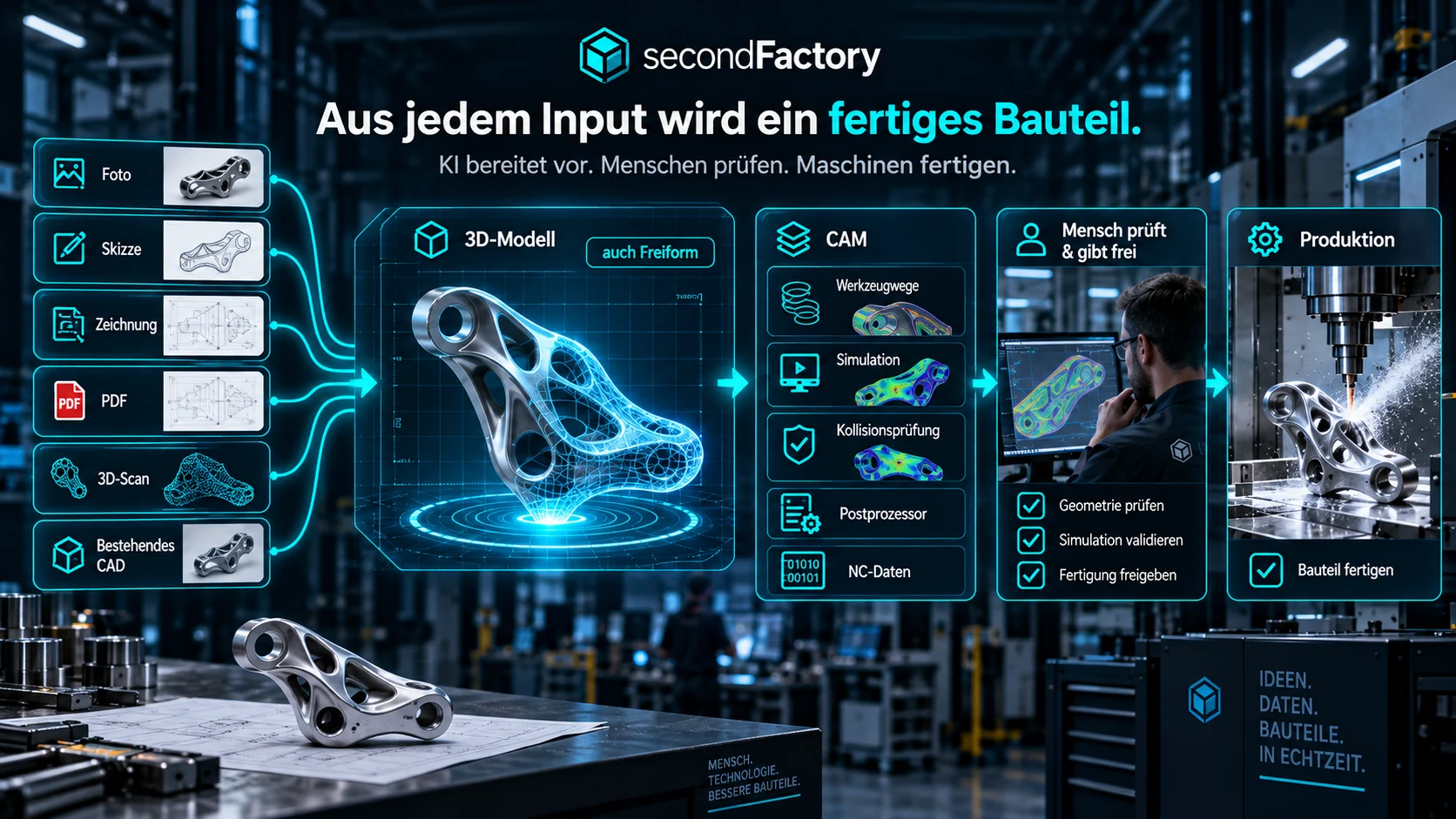
From photo to machine – without media breaks.
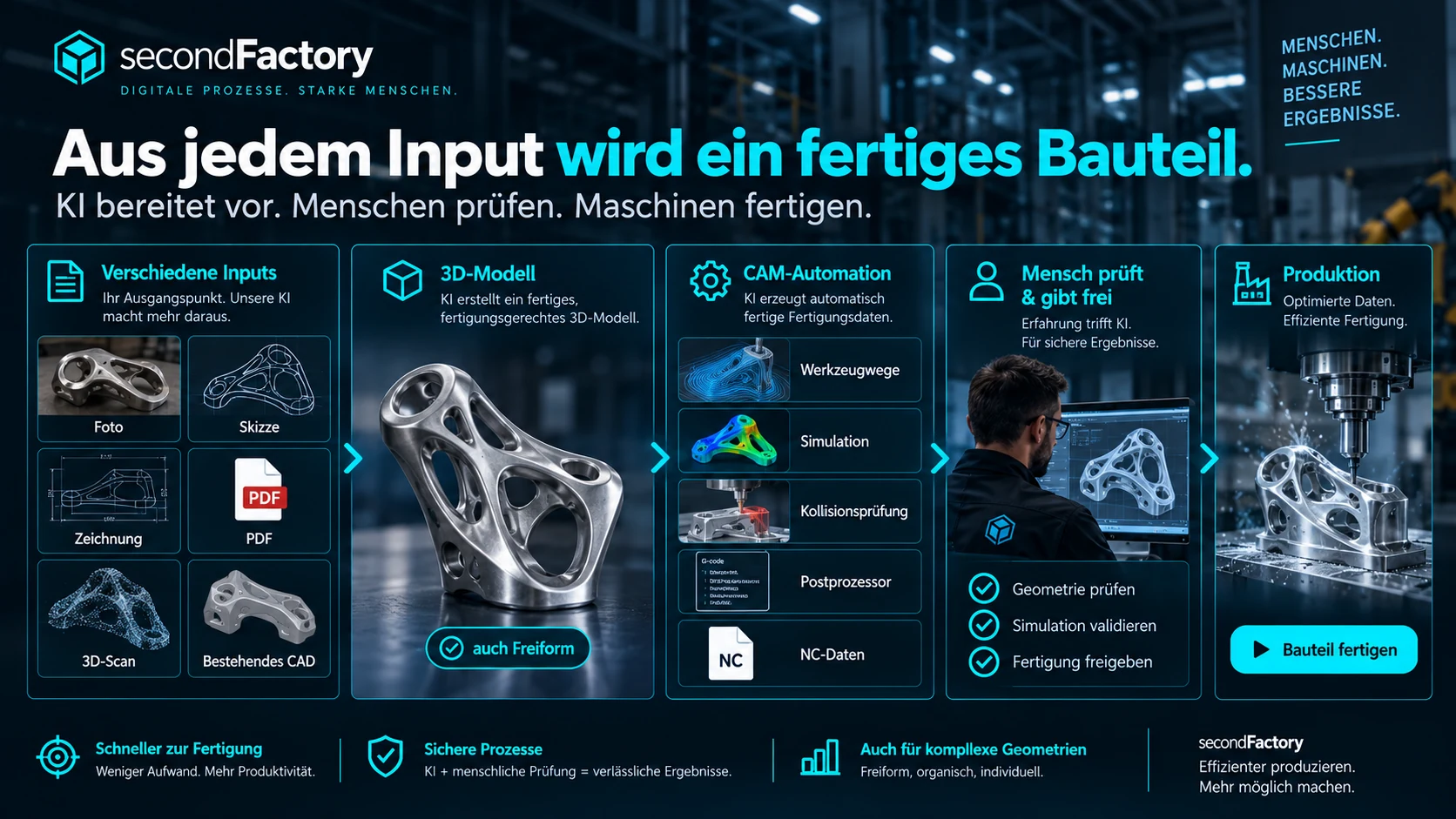
secondFactory connects recognition, reconstruction, design engineering, CAM, review and manufacturing in one controllable process. Automation takes over the time-consuming legwork. Skilled staff check geometry, manufacturability, toolpaths and exceptions, correct as needed and approve the results. The goal is not to replace expertise, but to drastically reduce recurring CAD/CAM processing times.
Not just classic drawings.
Especially where geometric data is incomplete, AI can deliver the greatest leverage. secondFactory can derive suggestions for 3D models and manufacturing geometries from visual and geometric sources and transfer them into a reviewable technical workflow.
- Photos and image series as a starting point
- Scans and 3D scans / point clouds
- Hand sketches, paper drawings and PDFs
- 2D CAD, DXF/DWG and existing 3D models
- Freeform surfaces and complex contours
- Versions, changes and corrections traceable
From geometry to machining.
Automation does not end with the 3D model. The process can be continued through CAM preparation, simulation and machine-specific output.
CAD & design engineering
Generate and model geometry, parameterize it, derive variants, check surfaces and features.
CAM & tools
Select tools, prepare machining strategies, generate and optimize toolpaths.
Simulation & collision control
Check tool, holder, part, clamping fixtures and machine workspace before output.
Post-processor
Translate CAM results to the control and specifics of the target machine.
Machine data
Provide NC programs and accompanying manufacturing data to production in a structured way.
Approvals
Before critical transitions, a person reviews the result, corrects it as needed and deliberately approves it.
AI accelerates. Skilled staff decide.
secondFactory is deliberately not a black box. Every important step can be set up as a controlled gate: suggestion → review → correction → approval → next step. Problems and uncertainties become visible instead of being silently passed on.
- Review technical results before handover
- Flag uncertainties and open issues
- Control approvals based on roles and permissions
- Log corrections and decisions
- Use local AI when data should not leave the company
- Map employees’ expertise as rules and standards
Less modeling and CAM programming from scratch.
The AI takes over a large part of the recurring preparation. Skilled staff focus on exceptional cases, technical evaluation, optimization and approval. This can significantly shorten the time from the arrival of an idea to a production-ready file.
When production knowledge needs to stay in-house.
Depending on the setup, the AI functions can run on local models or on your own LLM in the customer's infrastructure. This allows sensitive drawings, manufacturing know-how, machine parameters and process data to be processed in a controlled way.
On-premise
Can run entirely within your infrastructure.
Your own models
Local AI or your own LLM on your hardware.
Roles & permissions
Only authorized people can see data and approve.
Auditable
Document decisions, approvals and handovers in a traceable way.
Show us a real part.
Whether photo, scan, free-form part or technical drawing: in a demo, we can walk through the possible workflow from input information to manufacturing file based on your process.
From modeler to reviewer and optimizer.
Instead of rebuilding every recurring model, every tool selection and every CAM program entirely by hand, secondFactory generates a technically traceable proposal. Staff review the critical points, correct exceptions and approve. Depending on the part family, data quality and standardization, a large share of the previous CAD/CAM processing time can be eliminated as a result.
3D from many sources
Photo, sketch, scan, technical drawing, PDF, existing CAD or 3D scan – including complex free-form geometries.
Prepare CAM automatically
Tools, strategies, infeeds, toolpaths, rest material, simulation and collision checks are prepared.
Machine-specific output
Post-processor and NC/machine data are generated for defined machines; approval stays with a human.